 KWAI ADS
Kwai Cloaker
Traffic filtering built to scale Kwai Ads with real quality
Kwai delivers high volume at a low cost, but bots, proxies and unwanted visits come with it. The White Rabbit analyzes every visitor in real time so only legitimate traffic reaches your offer.
What threatens your campaigns
High volume, low quality
Kwai's cheap traffic comes mixed with bots and invalid clicks that inflate your metrics, drain your budget and distort every read you take on campaign performance.
Competitors spying on your offer
Spy tools crawl Kwai ads around the clock. Without filtering, your landing page, creatives and funnel are exposed for any competitor to copy.
Scaling blocked by unwanted traffic
As your campaign scales, masked traffic from proxies and VPNs scales with it. That is exactly when a healthy campaign turns into losses if you don't control who gets in.
How the cloaker works on Kwai Ads
The cloaker sits between the click and your page, and splits traffic into two destinations.
How to set it up
- 1
Add your domain
Connect your domain to The White Rabbit via DNS, JavaScript or plugin. Integration takes minutes and requires no changes to your page structure.
- 2
Create a campaign with filters
Set up a campaign for Kwai Ads and enable the filters that fit your operation: bots, proxy/VPN, geolocation, device and more.
- 3
Use the protected link
Place the generated link in your Kwai ads. From there, every visitor is analyzed in real time and only legitimate traffic reaches your offer.
Filters and protections
Bot blocking
Identifies and stops automated traffic before it inflates your numbers and burns budget on clicks that will never convert.
Proxy and VPN filter
Detects masked connections in real time and keeps anonymous access from polluting your Kwai campaigns.
Spy tool protection
Blocks ad spy tools and automated crawlers, keeping your funnel and creatives away from competitors' eyes.
Geolocation filter
Allow only the countries and regions where your offer runs. Essential for Latin American campaigns segmented by country.
Device filter
Kwai is mobile-first by nature. Let in only the devices that matter to your campaign and drop visits outside your target profile.
Language and ISP filter
Combine browser language and internet provider to separate your campaign's real audience from visits that make no sense for the offer.
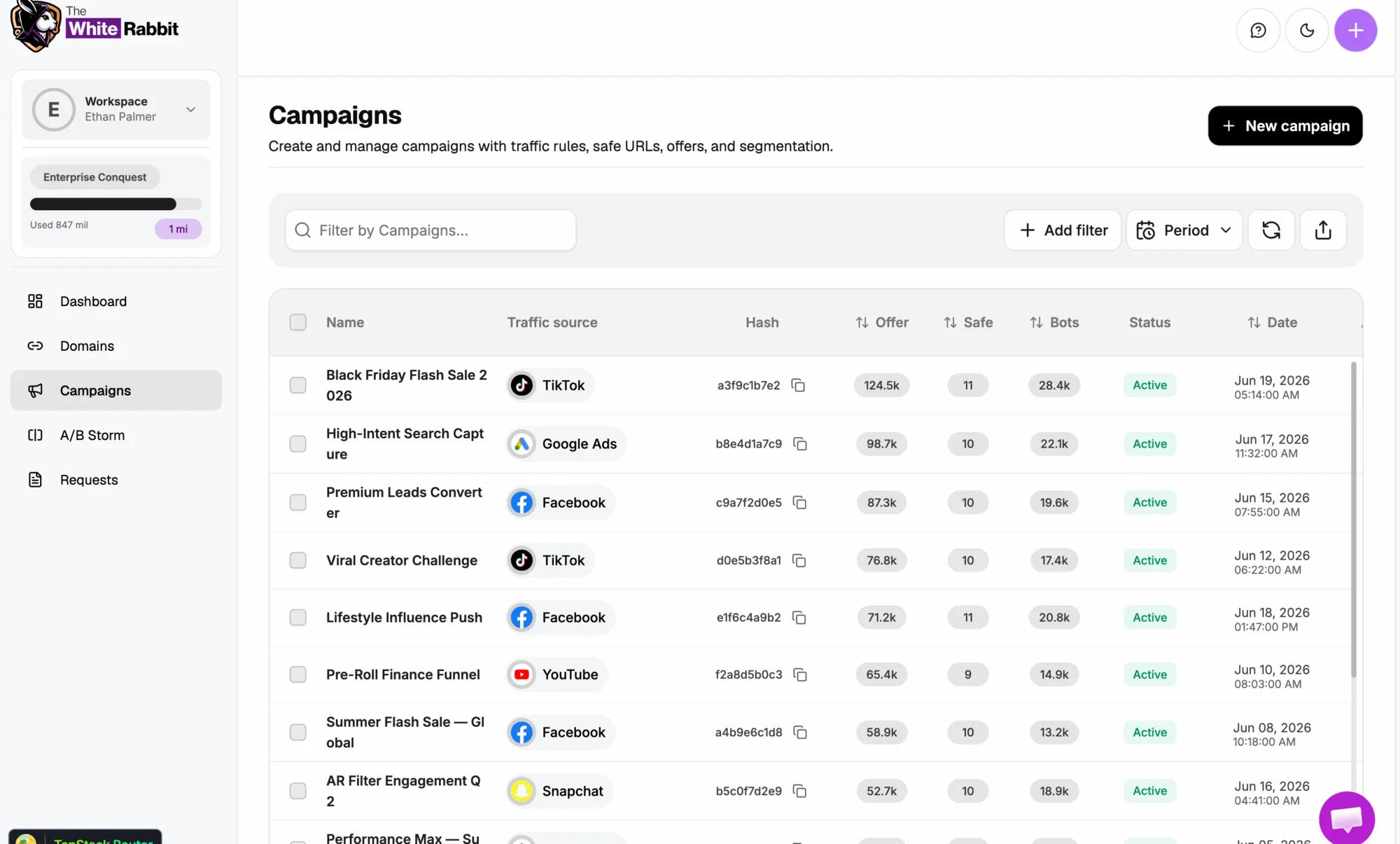
Inside the platform
Campaigns, domains and filters in one place, with the history of every decision.
Frequently asked questions
Why do I need traffic filtering on Kwai Ads?
Because Kwai's high volume comes with invalid traffic: bots, proxy connections and spy tools. Filtering separates real visitors from the rest, protects your budget and improves the quality of the data you use to optimize.
Does The White Rabbit work with any type of page?
Yes. Integration works via domain, JavaScript or plugin, so it fits custom landing pages, WordPress, page builders and the pre-landers commonly used in affiliate campaigns.
Does filtering slow down my page?
Not noticeably. Analysis happens in milliseconds, before the offer loads, and legitimate visitors go through the normal flow without noticing anything.
Can I segment by country for Kwai campaigns in Latin America?
Yes. The geolocation filter lets you allow only the countries and regions in your campaign, which is essential when you run country-specific offers across Brazil and the rest of Latin America.
Will I lose real traffic with filters enabled?
The goal is the opposite: filters are configurable per campaign and you define exactly the visitor profile you want to receive. What gets removed is the traffic that would never convert.

Scale on Kwai Ads without paying for invalid traffic
Enable filtering in minutes and let only real visitors reach your offer.
Protect my traffic → Facebook Cloaker
 Google Cloaker
 TikTok Cloaker
 Taboola Cloaker
 Native Ads Cloaker